

Most of the AI writing tools our clients use are good at drafting. Ask ChatGPT or Claude for a blog post on almost anything and you’ll have something workable in under a minute. Getting that draft into WordPress is slower. Somebody still has to paste it in, clean up the formatting, pick categories and write the meta description, and on a busy week that can take longer than writing the post did.
Model Context Protocol, or MCP, lets an AI tool connect to your WordPress site and handle that work itself. With the right setup, the assistant you already use can read your existing posts, save new drafts and update metadata without anyone copying text between browser tabs.
We’ve been building these connections for clients since August 2026, and we use one on our own blog. This post covers how MCP works with WordPress and what we’ve learned building it for clients, including the security side, which deserves more attention than it usually gets.
What MCP Actually Is
Anthropic released MCP in late 2024 as an open standard for connecting AI models to outside software. A developer builds one MCP server for a system like WordPress, and any AI app that supports the protocol can use it.
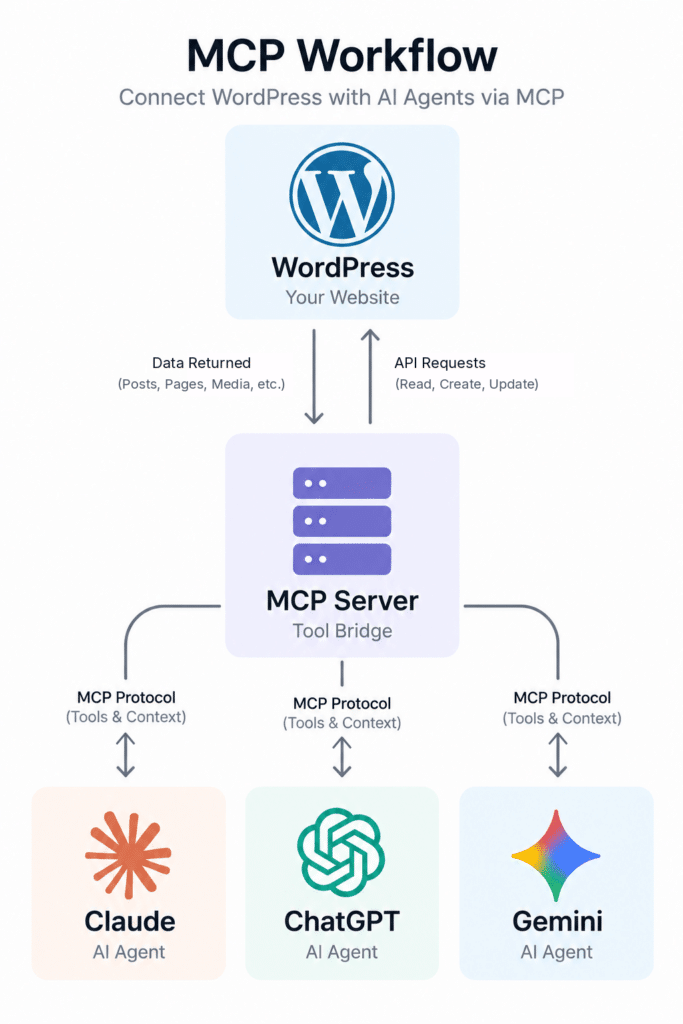
Before MCP, connecting an AI model to your CMS meant building a custom integration for that specific model. If your team later wanted to try a different assistant, the developer started over from scratch.
Where WordPress Stands on MCP
W3Techs data from October 2026 shows WordPress running on about 40 percent of all websites and nearly 59 percent of sites with an identifiable CMS. Given that reach, the WordPress project started building official AI support, and two pieces have shipped so far.
The first is the Abilities API, which came with WordPress 6.9. It gives WordPress a central registry of capabilities that AI agents, automation tools and developers can discover and call. A booking plugin, for example, can use it to tell AI tools in a structured way that it knows how to create a reservation.
The second is the MCP Adapter plugin. It makes your site’s registered abilities available to MCP clients and manages the protocol negotiation, permissions and error handling. Once both are in place, any plugin that registers abilities becomes something your AI assistant can use.
Both are new, and you should treat them that way. WS Form’s tutorial notes that the Abilities API and MCP Adapter are still under development, with breaking changes possible in newer versions.
What We’ve Used It For
Online demos tend to show an AI writing and publishing a post from one prompt. That’s possible, though in our client work the bigger payoff has come from maintenance work that piles up over years and never gets prioritized.
A few of the projects we’ve scoped or built:
- Writing meta descriptions for hundreds of older posts that never had them, with each one saved as a revision so an editor can approve it.
- Merging duplicate tags. Plenty of sites have “SEO” and “Seo Tips” sitting side by side, and an agent can map and consolidate them in an afternoon.
- Pulling GA4 and Search Console data alongside post content so the AI can point out which pages are losing traffic and suggest specific updates.
- Turning a published post into social captions and an email draft.
We set up each of these so that someone on the client’s team reviews the output before anything is published. The agent does the repetitive steps, and the review usually goes quickly because the edits are small.
Security Questions Worth Asking
If the idea of an AI with write access to your website makes you uneasy, that’s a reasonable reaction. We spend a good part of every discovery call on it.
The risks have been studied by both government and academic researchers. In May 2026, the NSA’s AI Security Center released MCP guidance saying existing cyber defense approaches don’t adequately cover these new risks. An academic benchmark called MCPTox, presented at AAAI, tested poisoned tool descriptions on 45 live MCP servers and 20 well-known AI agents, and a separate study by Hasan and colleagues found tool poisoning patterns in 5.5 percent of the 1,899 open-source MCP servers it examined. Tool poisoning hides instructions inside the plain-language description of a tool. The AI reads those descriptions to decide what to do, so a malicious one can change its behavior.
Prompt injection works in a similar way through content the agent reads. A blog comment telling the AI to delete every draft could, on a badly built setup, get acted on. OWASP’s MCP guidance lists excessive permissions among the most serious risks, since over-privileged servers break least-privilege rules and give attackers more to work with.
Our defaults are conservative. Agents get only the abilities their workflow requires, so an agent built for metadata cleanup has no way to delete a post. New content is saved as a draft, every action is logged, and we don’t install third-party MCP servers on client sites without reviewing the code first.
Off-the-Shelf Plugin or Custom Build?
The MCP Adapter is free, and a developer who knows PHP can register a few abilities and test them in Claude Desktop without much trouble. For a simple use case on a standard site, that may be all you need.
Custom work comes in when the agent has to follow your rules. Approval steps, brand guidelines, custom post types a past developer never documented and connections to your CRM all have to be built for your specific setup.
Depending on the site, we either build on the official adapter or run a separate MCP server that talks to WordPress through its REST API. Running the server outside WordPress keeps the install clean and lets a single server work with several AI tools at once. We make that call during discovery, once we’ve seen what your site already runs.
How We Build WordPress AI Agents
Every project starts with a working session where we list the WordPress tasks taking up the most of your team’s time. Two or three workflows usually account for most of the hours, and those become the first abilities we build.
We design and build the agent, then test it on a staging copy of your site before it touches production. A basic agent that reads posts, publishes posts and adds tags takes about two to three weeks, and projects linking WordPress to several outside systems take longer. At the end you get the server code, documentation and training in whichever AI tool your team prefers. Since the agents use MCP, they work in Claude, ChatGPT, Google Gemini and other platforms that support the protocol, so switching AI vendors later doesn’t mean rebuilding.
“When we talk to marketing teams, very few of them say writing is what slows them down. They get stuck after the draft exists, in the hours of formatting and tagging that happen inside WordPress. MCP is the first thing we’ve seen that lets an AI take that work off their plate. We still want a person approving anything that goes live. That person just shouldn’t be spending their afternoon pasting meta descriptions.”
Matt Chiera, Founder, Ice Nine Online
Getting Started
If you want to test the idea before committing to a project, pick one repetitive WordPress task your team handles every week and write down each step. That document makes a good starting brief, whether you build the agent yourself or bring in help.
You’ll also want to be on WordPress 6.9 or later, since the Abilities API ships with that release. Updating is worth doing for security reasons anyway.
If you’d like us to look at your site, you can reach us through our contact page, and there’s more detail on scope and process on our WordPress AI Agents service page.